For any serious trader, a trading strategy is just a hopeful idea until it has been rigorously tested.
Backtesting is the process of applying your trading rules to historical data to see how it would have performed, and MetaTrader 4 (MT4) and MetaTrader 5 (MT5) have a powerful, built-in tool for this very purpose: the Strategy Tester.
Whether you’re testing a simple moving average crossover or a complex Expert Advisor (EA), learning to use the Strategy Tester is a non-negotiable skill for validating your ideas before risking real capital. This process is essential for traders using any broker, including our preferred partner Pepperstone, which provides robust MT4 access.
A Step-by-Step Guide To The MT4 Strategy Tester
The MT4 Strategy Tester allows you to simulate your trading strategy over years of historical data in a matter of minutes. You can test manual strategies by visually stepping through charts or automate the process by programming your rules into an Expert Advisor (EA).
The tester provides a detailed report on key performance metrics like profit factor, drawdown, and the number of trades, giving you a data-driven view of your strategy’s viability. This moves your trading from guesswork to evidence-based decision-making.
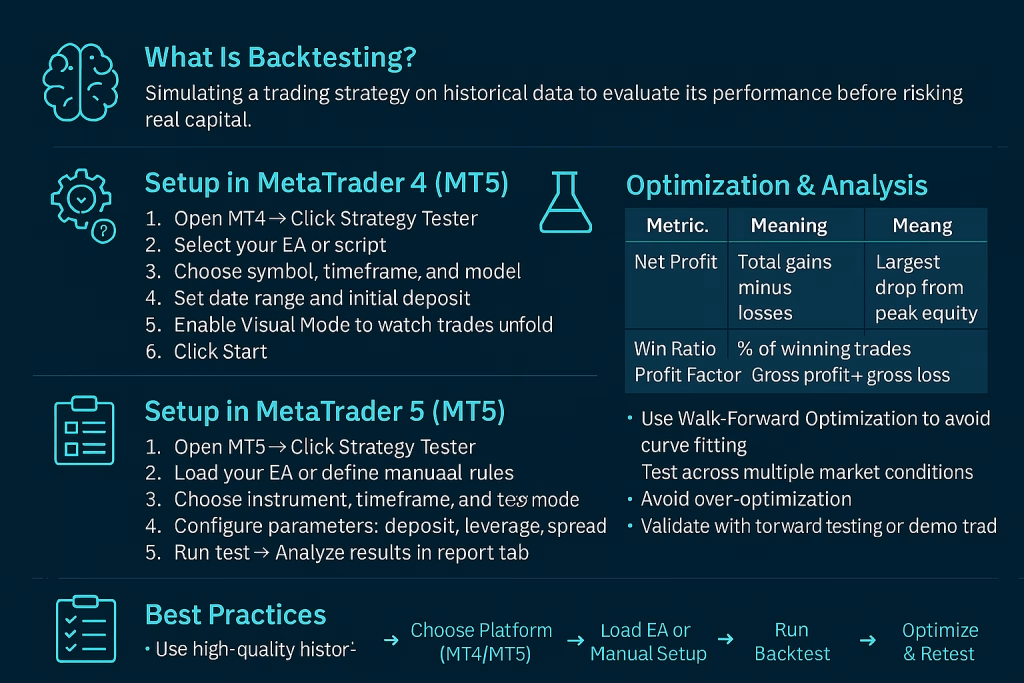
- Access the Strategy Tester: In MT4, go to View > Strategy Tester or press Ctrl + R. This will open the testing panel at the bottom of your platform.
- Select Your Strategy or EA: In the dropdown menu, choose the Expert Advisor you want to test. If you are testing a manual strategy, you will use the “Every Tick” model to visually control the test (see FAQs).
- Choose the Symbol and Timeframe: Select the financial instrument (e.g., EURUSD) and the specific chart timeframe (e.g., H1) you designed your strategy for.
- Set the Date Range: Define the period of historical data you want to test. It’s wise to test across different market conditions (e.g., high volatility, low volatility) to ensure robustness.
- Select the Modeling Quality: Always choose “Every tick” for the most accurate results. This uses the highest quality available historical data to simulate price movement.
- Analyze the Results Report: After the test completes, click the “Results” tab and then “Report.” critically analyze key metrics like Total Net Profit, Maximum Drawdown, Profit Factor (aim for >1.5), and the number of trades to assess the strategy‘s strength.
FAQs
What is the difference between visual backtesting and automated backtesting in MT4?
Visual backtesting is a manual process where you use the Strategy Tester in “Every Tick” mode to move through historical data bar-by-bar, manually applying your strategy‘s rules to see potential entries and exits. Automated backtesting requires an Expert Advisor (EA) that codes your rules; the MT4 tester then runs through the history automatically, executing trades based on the code.
Why are my backtest results different from my forward test or live trading?
This is often due to a flaw called “overfitting,” where a strategy is too finely tuned to past data and fails in real markets. Other causes include poor historical data quality, not accounting for slippage and commissions in the backtest, and the inherent difference between historical and live market liquidity.
How can I backtest a manual trading strategy without an EA?
Use the “Every Tick” mode in the Strategy Tester. Press the “Start” button and then use the buttons that appear (e.g., the double right arrow) to move forward in time. Visually identify your setup based on your rules and use the “Buy” or “Sell” buttons in the tester to simulate trades, manually moving your stop loss and take profit.
What is a good profit factor from a backtest report?
A profit factor above 1.0 means the strategy is profitable. Generally, a profit factor between 1.5 and 2.0 is considered good, and anything above 2.0 is excellent. However, this must be evaluated alongside other metrics like drawdown and the number of trades.
Can I use the MT4 Strategy Tester for strategies on indices or commodities?
Yes, but only if your broker provides historical data for those assets. The availability and depth of historical data depend on your broker. Reputable brokers like Pepperstone, IC Markets, and FP Markets typically offer extensive historical data for popular instruments, which is crucial for accurate backtesting.
Final Thoughts
Knowing how to properly backtest a trading strategy is what separates amateur gamblers from professional traders. It provides the objective evidence needed to trust your system during inevitable losing streaks.
The MT4 Strategy Tester is an incredibly powerful and accessible tool for this purpose, allowing you to stress-test your ideas across years of market history in minutes.
To get the most accurate results, it is imperative to use a broker that provides high-quality, dense historical data and reliable execution. Pepperstone is an excellent choice for this, offering seamless MT4 integration and the data integrity needed for trustworthy backtesting.
Other top-tier brokers like IC Markets and FP Markets also provide robust MT4/MT5 platforms with comprehensive historical data feeds. By making backtesting a core part of your development process, you build confidence and significantly increase your odds of long-term trading success.
Trade Smarter with Pepperstone

Pepperstone

Elias Stroud is a professional forex trader and market analyst with over eight years of experience. His journey began with the common misconception that trading was a get-rich-quick scheme, a path that led to significant early losses. It was this initial failure that forced a pivot towards disciplined, long-term learning and strategy development.
Today, Elias specializes in price action analysis, focusing on identifying high-probability setups without relying on complex indicators. He has cultivated a premium-level trading account, a direct result of his commitment to a structured and professional approach to the markets. Elias is passionate about sharing the actionable insights and foundational principles that helped him transform from a novice to a consistently profitable trader.
For further verification of his professional standing and live trading credentials, please visit the “About Us” page where account confirmation screenshots are provided, along with links to his trusted broker, Pepperstone, and his primary charting platform, TradingView.