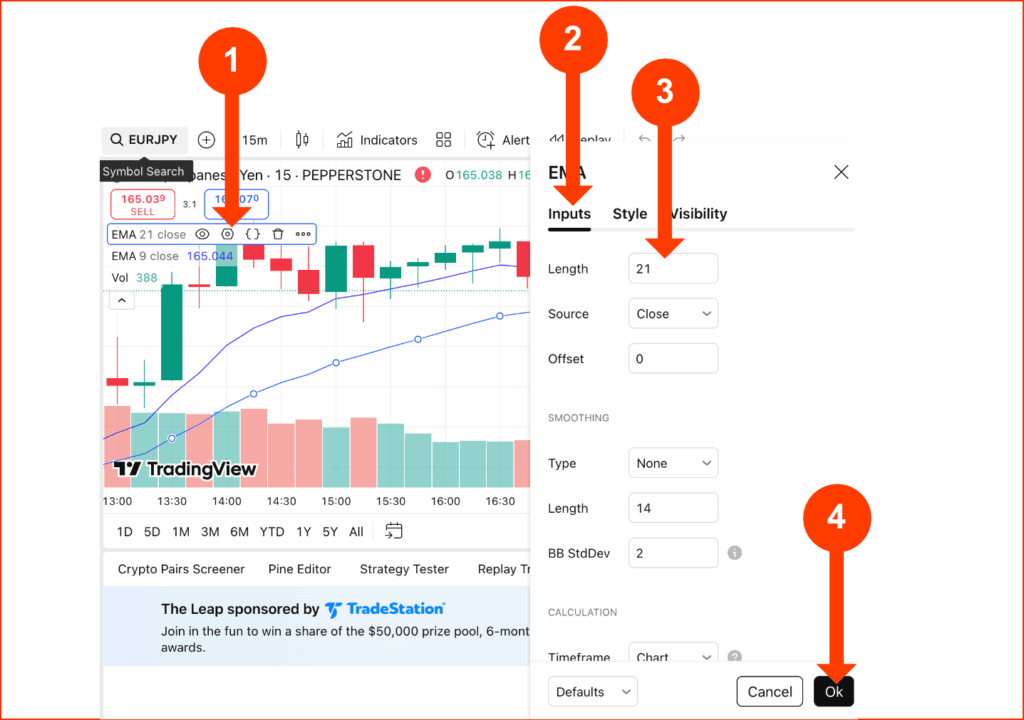
Yes it’s absolutely doable. I actually have 2 myself – I use one for analysing marketing and another for executing trades – and I do these with Pepperstone as my integrated broker.
So you can have multiple TradingView accounts by signing up with different email addresses. However, there are pros, cons, and best practices to consider before doing so. TradingView is a powerful charting and analysis platform used by traders worldwide, and managing multiple accounts can be beneficial—but only if done strategically.
Pros of Multiple TradingView Accounts
- Separate Personal & Professional Use – Keep trading strategies, watchlists, and alerts organized for different markets (e.g., forex vs. stocks).
- Testing Different Strategies – Use one account for backtesting and another for live trading to avoid clutter.
- Access to Multiple Free Plans – Free accounts have limited indicators/alerts; multiple accounts can bypass some restrictions.
- Broker-Specific Integrations – Some brokers (like Pepperstone, IC Markets, or XM Group) offer exclusive TradingView integrations—separate accounts may help manage different broker connections.
Cons & Risks
- Against Terms of Service? – TradingView’s policy discourages duplicate accounts unless for legitimate reasons (e.g., corporate use).
- Management Overhead – Switching between accounts can be cumbersome.
- No Shared Data – Saved layouts, scripts, and alerts don’t sync across accounts.
- Best Practices
- Use Different Emails – Avoid linking accounts to the same payment method to reduce suspicion.
- Leverage Paid Plans Wisely – If paying for multiple Pro accounts, ensure the cost justifies the need (e.g., team collaboration).
- Clear Purpose – Assign each account a specific role (e.g., one for scalping, another for long-term analysis).
FAQs
1. Can I Use the Same Broker with Multiple TradingView Accounts?
Yes, but check if your broker (e.g., Pepperstone or BlackBull Markets) allows multiple connections. Some may flag frequent logins from different accounts.
2. Does TradingView Ban Multiple Accounts?
Rarely, unless they detect abuse (e.g., spamming or circumventing paywalls). Keep usage legitimate.
3. What’s the Best Way to Manage Multiple Accounts?
Use browser profiles (Chrome’s “Profiles” feature) or separate devices to avoid accidental logins.
4. Can I Share TradingView Indicators Across Accounts?
No, but you can manually copy-paste script codes between accounts if you have access.
Final Thoughts
While multiple TradingView accounts are possible, they’re best used for distinct purposes—like separating personal and professional trading or testing strategies.
For seamless execution, pair TradingView with a reliable broker like Pepperstone (known for low-latency news trading) or IC Markets. Always prioritize compliance and efficiency over unnecessary duplication.
Pro Tip: If you need advanced features, consider upgrading to a TradingView Pro+ plan instead of juggling multiple free accounts.
Trade Smarter with Pepperstone

Pepperstone

Elias Stroud is a professional forex trader and market analyst with over eight years of experience. His journey began with the common misconception that trading was a get-rich-quick scheme, a path that led to significant early losses. It was this initial failure that forced a pivot towards disciplined, long-term learning and strategy development.
Today, Elias specializes in price action analysis, focusing on identifying high-probability setups without relying on complex indicators. He has cultivated a premium-level trading account, a direct result of his commitment to a structured and professional approach to the markets. Elias is passionate about sharing the actionable insights and foundational principles that helped him transform from a novice to a consistently profitable trader.
For further verification of his professional standing and live trading credentials, please visit the “About Us” page where account confirmation screenshots are provided, along with links to his trusted broker, Pepperstone, and his primary charting platform, TradingView.